 Pegasus
Find where work waits.
Most of a workflow’s time isn’t spent working. It’s spent waiting. Find the wait before you automate anything.
Reggie Britt · Pegasus Source
The idea
The usual pitch is speed. Speed is rarely the problem.
Most agent pitches promise the same thing: the work gets done faster. Faster review, faster data entry, faster answers. It sounds like the whole point.
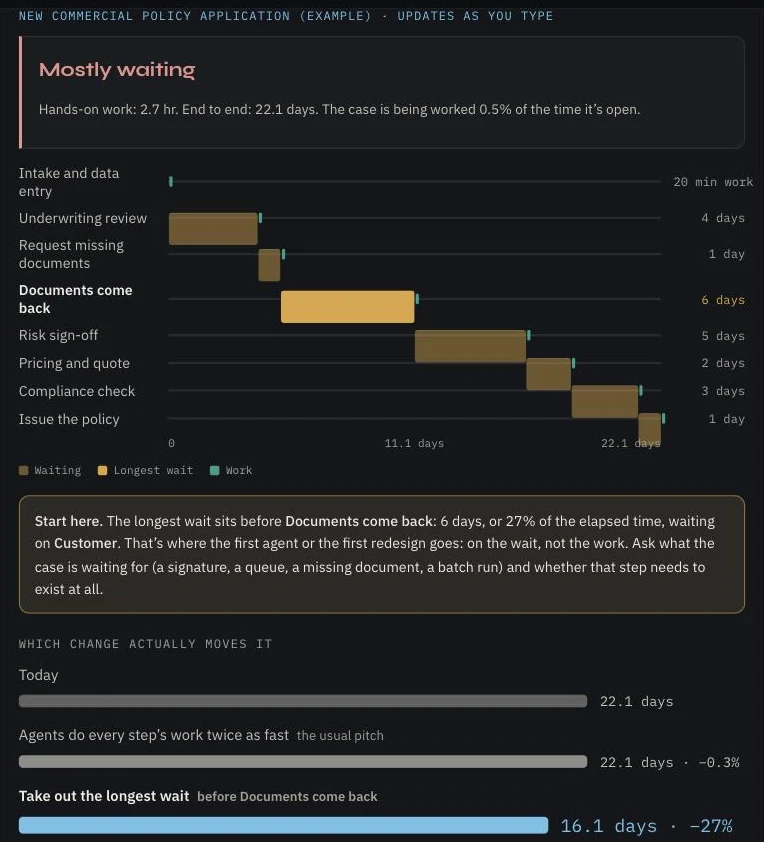
Then you time one real workflow from start to finish. A new commercial policy application takes 22 days end to end. The hands-on work adds up to under three hours. For the other 99.5% of the time, the case is sitting in a queue, waiting on a document, or waiting for someone to sign.
Make every step twice as fast and the case still takes 22 days. Remove the one longest wait and it takes 16. That’s the whole argument in two numbers.
One new commercial policy application, end to end
The example built into the Where work waits tool
Agents rarely save time by working faster. They save it by taking out the wait.
In the workspace
List the steps. The answer builds as you type.
Where work waits asks for one workflow and its steps. For each step you put down two numbers: how long the case sits before the step starts, and how much hands-on work the step takes. Then who or what it’s waiting on.
Rough numbers are fine. The gap between work and wait is usually so wide that being off by a day doesn’t change the answer. You can reorder steps by dragging them, and the longest wait is marked for you.
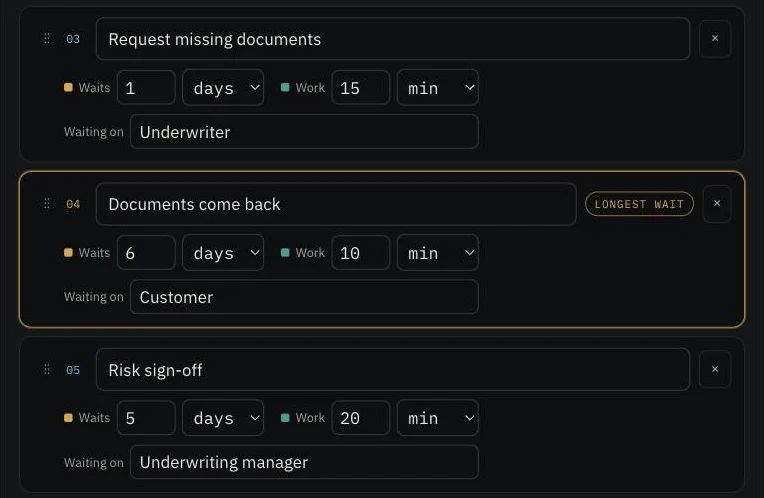
Beside the steps, the result updates as you go. It tells you whether the workflow is mostly working or mostly waiting, lays every step on one timeline, and names the place to start. At the bottom it compares the two changes side by side: the work done twice as fast, against the longest wait taken out.
Then ask
What is the case actually waiting for?
Finding the longest wait is the first half. The second is naming what it’s waiting for, because each kind of wait has a different fix, and only some of them are agent work.
Someone has to chase it. This is where agents earn their keep: the follow-up, the reminder, the check that what came back is complete.
The case is ready but nobody has picked it up. The fix is routing and capacity, and an agent can take the triage that clogs the queue.
A person has to decide. That decision stays with a named person, but you can ask whether it needs that person, and whether everything around it can be ready when they look.
The system only moves the case once a night or once a week. No agent fixes that on its own. It’s a question for whoever owns the system.
And one more question, the one people skip: does that step need to exist at all? Plenty of waits sit in front of a check that nobody remembers asking for.
At Silver Lake
The same shape in a loan renewal.
Silver Lake Financial Group ran its commercial loan renewal through the same tool. Four and a half hours of work, spread across 27.2 days. The longest wait was nine days, before the borrower’s financials came in.
Twice-as-fast work saved a fraction of a day. Taking out the nine-day wait saved a third of the time. So the first agent belongs on the chasing: getting the financials in, not reading them faster.
Silver Lake Financial Group is a demonstration company Pegasus uses to show this work running live. silverlakefinancialgroup.com ↗
By door
The same tool, whichever door you came in.
Where work waits is in every workspace. What tends to sit in the longest wait is what changes.
The wait is often at the edge of the platform.
IBM i usually does its part quickly. The days go to what happens around it: a nightly job, a file waiting to be keyed in, a hand-off to a system that can’t see the case.
Find the wait in Pegasus4i →The wait is usually a decision.
Approval chains, sign-offs and hand-offs between teams. Most steps in a slow chain are habit, not judgment, and an agent that could act in seconds still waits days for the organization to catch up.
Find the wait in Collective →The wait is usually someone outside.
A customer who hasn’t replied, a supplier who hasn’t confirmed. For a small team, the chasing is the job nobody has time for, which makes it the first job to hand over.
Find the wait in Source →Where work waits sits behind a free profile, so your workflow is saved and the other tools can open on it. The read before it needs no account.
The series